Show messages and dialogs
Use this guide after importing the module. It covers responses, custom actions, timers, images, placement, and restart decisions.
Ask a question
Show-FluenceMessage returns the selected button name. Choose OK, OKCancel, YesNo, or YesNoCancel with -Buttons.
$answer = Show-FluenceMessage -Title 'Update' -Message 'Install now?' -Icon Question -Buttons YesNo
if ($answer -eq 'Yes')
{
    Start-Update
}
Esc and the title bar close button return the cancel button, or the last button if the preset has no cancel button. For YesNo, a dismiss returns No; for OK, it returns OK. The command always returns a button name. An array passed to -Message displays as separate paragraphs.
Choose a default action
The message dialog is shown in both themes here.


The first preset button is the default unless -DefaultButton names another button in that preset. Enter activates it. Make an irreversible action opt in:
$answer = Show-FluenceMessage -Message 'Delete local data?' -Icon Warning -Buttons YesNo -DefaultButton No
-Icon accepts None, Info, Success, Warning, Error, and Question. Messages default to Info; general dialogs default to None.
This warning example shows the Warning body glyph and brush in light mode.

Customize the title bar
Window-opening commands accept -TitleBarIcon for the host window icon. Supply a local path, file: URI, or pack: URI. -Title sets the title-bar text; -TitleBarText is an alias for it. For example:
Show-FluenceMessage -Title 'Deployment status' -TitleBarIcon "$PSScriptRoot\assets\app.ico" -Message 'Ready to install.' -Icon Success
-Icon remains the severity or question glyph inside the dialog body, and -Image adds a body image. Dialog commands do not expose -ShowIcon; that switch is available on Show-FluenceWindow to hide its built-in host icon.
Add custom actions
Show-FluenceDialog accepts button names or New-FluenceButton specifications. Give each action a stable -Name so its result flag is easy to read.
$actions = @(
    New-FluenceButton -Text 'Install now' -Name Install -IsDefault
    New-FluenceButton -Text 'Later' -Name Later -IsCancel
)
$result = Show-FluenceDialog -Title 'Update' -Message 'A new build is ready.' -Buttons $actions
if ($result.Install)
{
    Start-Update
}
The result includes one boolean per button plus Cancelled and TimedOut. A bare Cancel string becomes a cancel button; another bare string remains an ordinary action. Mark a custom cancel action with -IsCancel to make Esc and title bar dismissal use it. See result objects for the full outcome contract.
Set a timeout
Show-FluenceDialog, Show-FluenceMessage, Get-FluenceInput, and Show-FluenceListSelection accept -Timeout from 1 to 86400 seconds. Add the -Countdown switch to show remaining seconds on the default button.
$answer = Show-FluenceMessage -Message 'Restart now?' -Buttons YesNo -DefaultButton No -Timeout 30 -Countdown
| Command | Timeout result |
|---|---|
Show-FluenceMessage | -DefaultButton, if specified; otherwise the dismissal button name. |
Show-FluenceDialog | TimedOut = $true; all button flags are false. |
Get-FluenceInput, Show-FluenceListSelection | $null. |
Show-FluenceRestartPrompt uses -Countdown <seconds> instead of -Timeout; its default is 60 seconds. -NoCountdown waits indefinitely.
Show an image and position the window
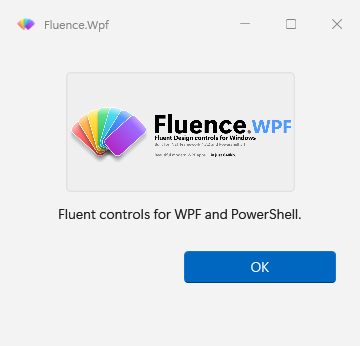
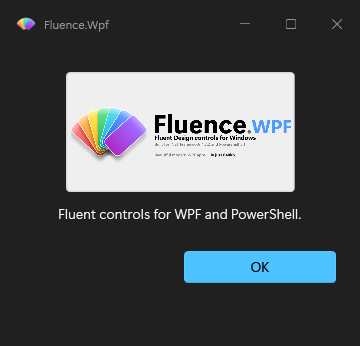
Use -Image with a local path, file: URI, or pack: URI. HTTP and data URIs are rejected. -MessageAlignment Center centers the image and text.
Show-FluenceMessage -Title 'Update' -Message 'Ready to install.' -Icon None -Image "$PSScriptRoot\assets\logo.png" -MessageAlignment Center -Buttons OKCancel
The capture notes describe the offscreen render and its DWM limitations.
-Position Center, TopRight, or BottomRight places a dialog in the primary monitor work area. -ParentWindow centers a Center dialog over its owner; a corner position takes precedence. Show-FluenceDialog -Topmost keeps a general dialog above other windows.
Ask about restarting
The restart prompt appearance is shown in both themes.


$outcome = Show-FluenceRestartPrompt -Title 'Update' -Message 'Restart to finish installation.' -Countdown 120
switch ($outcome)
{
    'Restart' { Write-Output 'Restart requested.' }
    'Later' { Write-Output 'Restart deferred.' }
    'TimedOut' { Write-Output 'No decision before timeout.' }
}
The command reports Restart, Later, or TimedOut; the calling script decides whether to restart. Its warning icon and topmost behavior are defaults. Use -NotTopmost to change the latter.
Appearance options on a dialog set process state. -Theme and -Backdrop are accepted by dialog commands; Show-FluenceDialog also accepts -Accent. Later dialogs inherit the applied values until changed. See change appearance at runtime.